A caller number and a caller name are different
Caller ID can include a telephone number and additional display information. The number identifies the calling line presented for the call. A business name, saved contact name or other recipient-side label is another layer.
Twilio’s CNAM guidance explains that caller-name display depends on the recipient’s carrier and enabled services. A number may therefore appear differently to different recipients. A successful test of the calling number does not certify that every customer will see the same name.
Current 26sim US rental does not promise a custom business-name display. Ask support about a specific naming requirement before making it part of your contact plan.
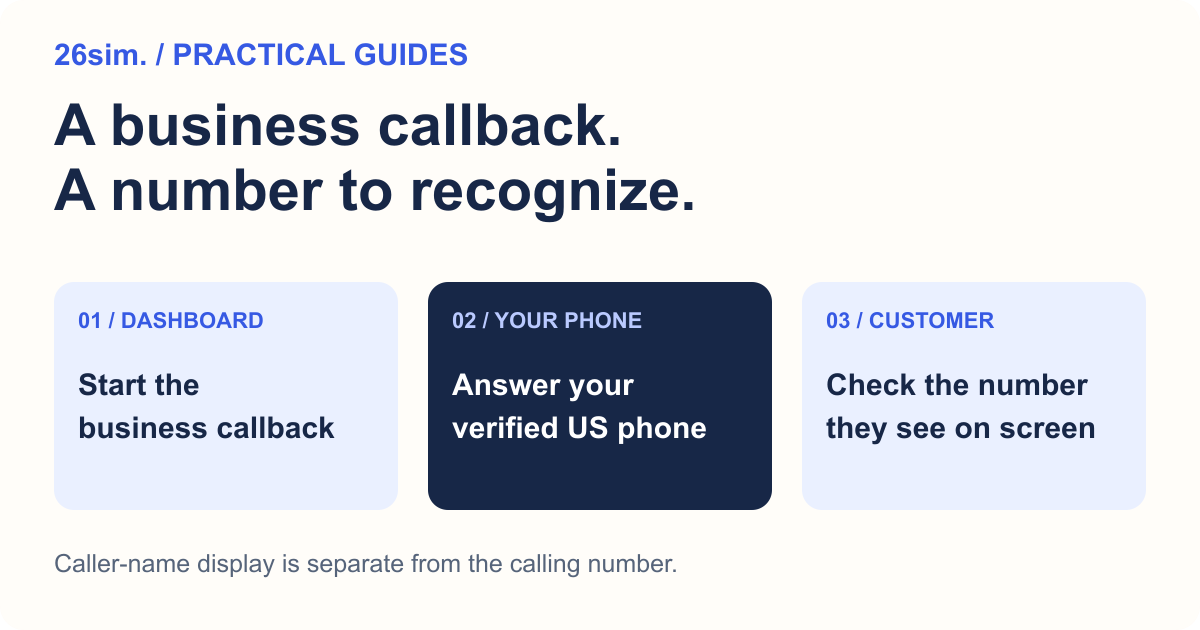
Use the business callback path consistently
Calling directly from your personal carrier line uses a different route and can reveal your personal number. Saving a customer in your phone’s contacts does not change which service places the call.
- 01
Open your active number dashboard
Use your private paid receipt to access the correct assigned number. Confirm the line is ready and the forwarding phone is verified.
- 02
Start the supported outgoing call
Enter a supported destination under Your calls and use the dashboard action. Confirm sufficient available minutes or usage credit.
- 03
Answer your existing US phone
The service calls your verified phone first. After you answer, it connects the destination, presenting the business number for that callback.
- 04
Ask the recipient what appeared
During a test, have the other person read back the displayed number. Record the digits separately from any name or label.
Interpret the test result before changing settings
Use a recipient who can compare the actual digits, and account for how their phone labels a saved contact. A screenshot with private information removed can help explain a display issue. Treat a name or label report separately from a failure to connect.
| Observed result | What to check | Useful next step |
|---|---|---|
| The recipient sees your personal number | Whether the call started in the personal phone app. | Repeat the test through the business dashboard. |
| The business number appears without a business name | Number presentation separately from caller-name display. | Confirm any naming requirement with support. |
| One recipient sees a different name or label | The receiving service and its displayed information. | Report the exact label, carrier if known and time of the test. |
| Your phone rings but the customer is not connected | The supported destination, line state and available funding. | Check dashboard status and contact support before repeating an uncertain request. |
Recognize the business number on forwarded calls
The current 26sim US incoming-call route also presents your business number to the verified forwarding phone. This can help you recognize that the call reached you through the business service. Do not assume your phone’s incoming display shows the original caller’s number.
Test this direction too: ask another person to dial the public business number and note what appears on your existing phone. Keep the incoming-call test separate from the outgoing callback test so you know which route you are observing.
Make the callback routine easy to follow
Keep the dashboard available when returning work calls, and use the same published business number on your website and email signature. When arranging a callback, tell the customer which number to expect and a realistic time.
Available call minutes or prepaid funding, the verified phone and a supported destination are still required. Current calls stop at 30 minutes or earlier at the funded limit. These operating details matter independently of what the recipient sees on screen.
The external caller-name reference was checked on November 2, 2026. It explains display behaviour rather than confirming a custom-name service for any particular 26sim order.
A separate caller number is not complete anonymity
A separate callback number can keep your personal carrier number out of that ordinary contact. It does not remove information you share in conversation, a recognizable voicemail greeting, an existing saved contact or details published elsewhere. The number service and recipient’s systems can also retain records.
Current 26sim callback presents the rented business number. It does not promise a random shared identity, a personal-number selection toggle, a custom business-name label or untraceable calls. Calling through your personal phone’s normal carrier dialer remains a separate route that can show your personal number.
A carrier feature that withholds caller-number display is different from providing a separate callback contact. Do not assume that a code such as *67 works on every network or across countries. Use only supported identity controls for legitimate contact; a display setting is not permission to impersonate another person.
If recipients need to return calls, publish a number whose incoming path you can maintain and test it separately. A monthly number is subject to renewal and release. Ask about the actual offer rather than assuming unlimited simultaneous numbers, instant replacement or a guaranteed absence from public directories.
Withhold the carrier number or provide a separate return number
For a one-off call, you may want the carrier to withhold your usual number from the recipient’s ordinary display. For customer contact, you may instead want a different reachable number displayed. These are different outcomes: a withheld call gives the recipient no useful return number on that screen, while a rented business number is intended to remain a contact point.
On current iPhone software, Apple documents Settings → Apps → Phone → Show My Caller ID. Turn it off for supported outgoing carrier calls; turn it on again to restore the setting. If it is missing or dimmed, contact the carrier. This is not the incoming-call screening menu and does not alter every third-party calling service.
Samsung’s own example uses Phone → More options → Settings → Supplementary services → Show your caller ID, with Network default, Never or Always choices. Its help explicitly qualifies network and country support, and older software can differ. Use the actual line’s instructions rather than treating that menu as universal Android behavior.
For an eligible Verizon line, its published one-call example is *67 followed by the full destination number, including area code. Where line-wide blocking is enabled, Verizon documents *82 before the number to permit display for one call. These are carrier-specific examples, not international dialing rules or supported prefixes to paste into the 26sim dashboard.
Test a permitted display change without promising anonymity
Withholding has exceptions. Verizon identifies calls to 800 numbers and 911 as exceptions to its caller-ID blocking; other networks have their own rules. Recipients can also reject unidentified calls. Use a consenting ordinary test contact, restore the intended setting afterward and use another agreed contact route if the recipient does not accept withheld calls. Do not use display controls to bypass a person’s refusal or impersonate someone.
The call-number setting does not hide the sender of an ordinary SMS. Samsung explicitly separates that texting behavior from voice caller-ID controls. If you want a separate texting contact, use a service that actually supplies supported messaging from its assigned number. A code typed before a voice destination does not convert your personal SMS into anonymous texting.
For current 26sim US service, the dashboard callback presents the rented number and rings your verified existing US phone before connecting a supported ordinary US destination. It is not a toggle for withholding your personal carrier line, selecting an arbitrary caller number or spoofing someone else’s identity. Outgoing SMS requires registration approval; MMS and international or toll-free voice destinations are not supplied by this workflow.
Keep the distinction when giving contact details: a displayed business number can receive a return call only while its actual service is active and correctly routed. Neither withholding nor using another number removes the information you speak, recipient records, provider records or an identifying voicemail greeting.
Common questions
Will my business name automatically appear on every call?
No custom-name display is promised by current 26sim US rental. Caller-name display is separate from the telephone number and depends on the recipient’s carrier and enabled services.
Can I call from my personal dialler and show the business number?
The supported 26sim workflow starts in the dashboard and calls your verified existing US phone first. A call placed directly through your personal carrier line can present your personal number.
What number appears when a customer call is forwarded to me?
The current 26sim US forwarding route presents your business number to the verified phone. Test the route rather than assuming that the original caller’s number will appear there.
What should I report if the display looks wrong?
Include the order reference, call time and time zone, whether it was incoming forwarding or a dashboard callback, and the exact number or label displayed. Keep private receipt and dashboard links out of the report.
Does a different displayed number make my call anonymous?
No. It changes one contact detail, while spoken identity, published information and service records remain relevant. Use the actual supported callback route and test its display.
Does *67 hide my number on every phone network?
No. Verizon documents it for supported per-call caller-ID blocking, with exceptions including 800 numbers and 911. Confirm your own country, carrier and calling route; do not add it to a service’s destination field without explicit support.
Will disabling Show My Caller ID also hide my SMS sender?
No. A carrier voice caller-ID setting does not remove the sender identity of an ordinary text. A separate messaging number has its own capabilities and records; it is not a guarantee of anonymity.