What you need before turning on forwarding
This guide covers a 26sim US number. If you already have a business number with another carrier, use that carrier’s forwarding instructions instead. Codes and settings differ between services; do not enter a generic forwarding code expecting it to configure the 26sim dashboard.
- An activated 26sim US monthly number and access to its private dashboard.
- An existing US phone you control and can answer for verification.
- Available included call minutes or sufficient prepaid credit.
- A second phone or a helper to test the incoming route and a callback.
What happens when a customer calls
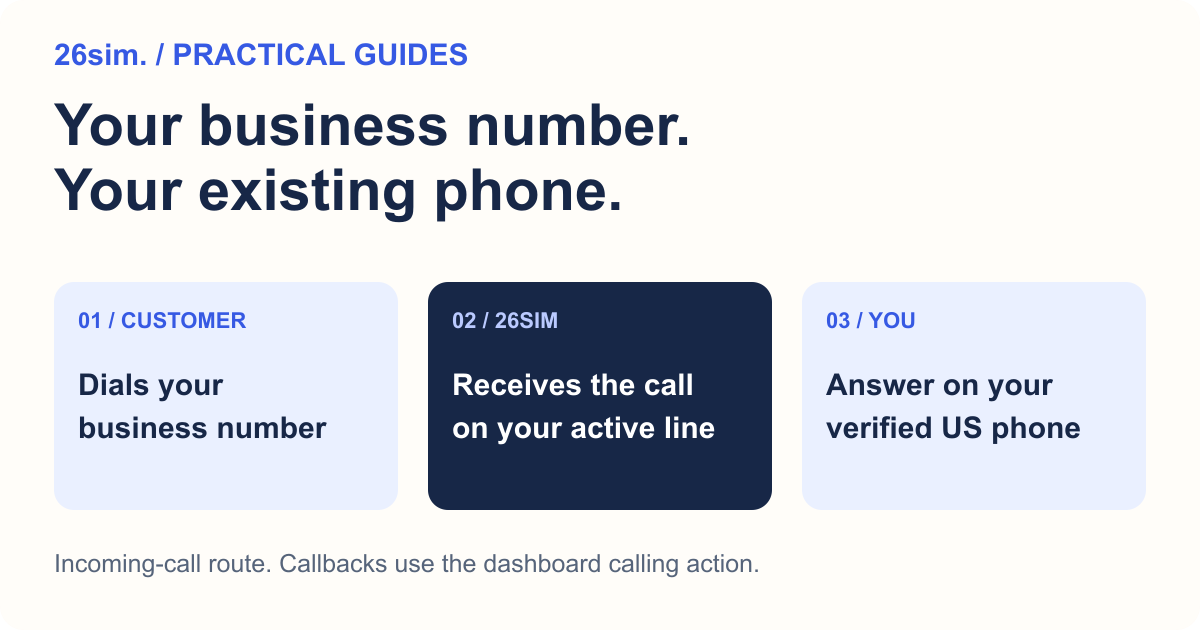
The customer dials the business number. The provider receives that call and connects it to the destination you configured. Your personal phone receives the forwarded call, so you can answer without publishing that phone’s number as the business contact.
Forwarding is a routing feature. It does not by itself supply another mobile plan, move your SIM or establish a separate inbox for text messages. Providers can implement different routes and controls; Twilio’s forwarding tutorial describes connecting an incoming call to another number.
For an activated 26sim US number, the destination must be your verified existing US phone. This is not a promise of forwarding to any country or of answering inside your browser. Check the supported destination and confirm the phone can receive calls before relying on the setup.
Set up forwarding for your 26sim US number
These steps apply after a real payment is verified and supplier activation completes. Test checkout does not activate a usable number. Keep your purchase receipt private because its link grants access to your number dashboard.
- 01
Open your private number dashboard
Open your purchase receipt and choose Open my number. Confirm the assigned number is active. Finding inventory or opening checkout alone does not complete activation.
- 02
Enter the phone you will answer
Under Your calls, enter your existing US phone and choose Verify my phone. Use a phone you control and can answer now.
- 03
Complete the verification call
Follow the verification prompt and confirm the code from the call. The verification call uses included minutes or prepaid credit under the same calling rates.
- 04
Check available minutes or credit
Basic includes no call minutes. Premium includes 100 shared incoming/outgoing minutes per paid billing month. Ensure you have enough allowance or prepaid credit before testing.
- 05
Test from another phone
Ask someone to dial the activated business number, answer on the verified phone and confirm both sides can hear each other. Test a callback separately before publishing the number.
Use the business calling method for callbacks
Answering a forwarded call and returning it are different actions. If you dial a customer directly from your personal carrier line, that line can display its own number. Forwarding the original incoming call does not change the identity of every later call from your phone.
With 26sim, use Call from my number in the dashboard for a supported US destination. The service rings your verified phone first. After you answer, it connects the destination using the business-number calling flow. The connection depends on your existing phone being able to receive that first call.
Ask a test recipient to confirm the number displayed on a callback. Avoid promising that every receiving device will display a particular business name. Also check the number used when replying by text: replying from your personal phone’s message app is not the same as sending through the business inbox.
Understand rental, call minutes and carrier charges
26sim Basic costs $2.99 per month plus $0.03 per started connected call minute. Premium costs $6.99 and includes 100 minutes shared between incoming and outgoing calls each paid billing month. Extra minutes cost $0.03 each. Included minutes do not roll over.
Round each call separately when estimating. Five connected calls lasting 61 seconds each use ten billed minutes, not six. On Basic, those calls cost $0.30 in call usage in addition to rental. Verification calls also use minutes. For click-to-call, connected time can include the period after your phone answers while the destination is being connected.
Prepaid top-ups start at $5 and are separate one-time payments. A top-up adds a balance; it is not an extra usage fee on top of the same consumed credit. Check your existing phone plan for any separate carrier charges. These examples exclude taxes and other separately quoted fees.
Handle texts separately from forwarded calls
Forwarding voice calls does not mean business texts will arrive in your personal phone’s message app. For 26sim US numbers, incoming SMS appears in the private number dashboard with its time and segment count.
Outgoing SMS remains disabled until registration approval is complete. A verified forwarding phone does not approve messaging. Any registration fees are quoted separately before agreement. MMS is unsupported, so do not ask customers to send photographs to the number unless a separately confirmed service supports them.
If a forwarded call does not reach you
Before making forwarding your main business contact route, test what happens when you are busy or do not answer. Missed-call handling can depend on the destination phone and provider settings. This service does not provide emergency calling; use your existing phone directly for emergencies.
- Confirm the number is activated and the rental remains active.
- Check that the intended destination is entered and verified in the dashboard.
- Confirm the phone can receive an ordinary call and review its blocking or Do Not Disturb settings.
- Check remaining call allowance and prepaid credit.
- Give support the call time, time zone and order reference through a private support channel; never share your private receipt link publicly.
| Symptom | First check | Then check |
|---|---|---|
| The forwarding phone never rings | The number is active and the intended phone is verified under Your calls. | Available call allowance or credit, and whether the phone can receive an ordinary call. |
| Your phone rings for a callback, but the recipient is not connected | Answer the first call: click-to-call rings your verified phone before the destination. | The destination is a supported US number. Share the time and order reference with support if it persists. |
| A callback displays your personal number | Check how the call was placed. | Use Call from my number instead of dialling directly from the personal carrier line; test the displayed number with the recipient. |
| Calls work, but texts do not arrive on the personal phone | Voice forwarding and SMS have separate routes. | Open Your messages in the number dashboard. Outgoing SMS requires approval. |
Change or stop the route at the service that controls it
First identify the forwarding layer. A carrier forwarding rule on your personal phone and the rented business number’s forwarding configuration are different settings. Turning off one does not prove that the other stopped. Write down the public number, current destination and intended result before changing anything.
On a supported iPhone carrier line, Apple places Call Forwarding under Settings, Apps, Phone. Inspect the selected line and its available forwarding control; use the carrier’s instructions to disable the relevant rule or restore the intended destination. The menu and supported behavior depend on service type and carrier. Conditional forwarding for busy or unanswered calls may need a different carrier process from forwarding every call.
For a current 26sim rented-number route, use the supported setup and support process for that number. Do not assume a star code entered on your personal handset changes the rented number’s server-side destination, or that the dashboard contains an undocumented pause switch. Explain whether you want to change the receiving phone, stop a route or end the rental; those are separate requests.
After confirmation, ask a willing contact to call the public number and check the intended receiving and voicemail behavior. Then check a call directly to the personal line if that line should remain unaffected. Record a failure’s direction and time for support. Changing voice forwarding does not transfer or stop SMS by itself, and disabling a route does not automatically cancel a subscription.
Common questions
Do I need another SIM to receive forwarded business calls?
Not for the 26sim US forwarding setup described here. You need an activated number, a verified existing US phone and sufficient included minutes or prepaid credit. The existing phone still needs its own working connection.
Will call forwarding also forward SMS?
Do not assume so. Voice routing and messaging are separate features. 26sim incoming SMS appears in the private online dashboard rather than being forwarded into your personal carrier’s message app.
Can I answer 26sim calls directly in a browser?
The current US calling flow uses your verified existing US phone for forwarding and click-to-call. An online dashboard and SMS inbox do not establish browser audio calling.
Can I forward the number to a phone outside the US?
The current 26sim US calling setup requires a supported verified existing US phone. Do not assume an overseas destination is supported. Ask support about confirmed options before choosing a number.